I have a tubular part that will be torqued under a bending load in actual use (essentially a torque cable). However, the specific structure of this tube is such that there are potentially areas of “preferential bending” or rather that the moment of inertia is non-symmetric depending on bending direction. The goal is to minimize this difference in bending that is dependent on direction, so my plan is to simulate the use case by rotating the vector of the load about the tube axis (thus simulating the tube being rotated while in bending) and then graph the both the reaction forces and the stresses vs the angle.
I have been really struggling to get this to work in PrePoMax. Whenever I try to set up amplitudes that vary the magnitude of the bending moment, the result is zero force on the part and there are no results. Additionally, I cannot figure out how to force the program to make discrete time increments, I always end up with two increments at -1s and 1s (end time) no matter what I do. I assume the solution is extremely basic and I am missing something obvious. If anyone could help point me in the right direction that would be much appreciated.
Is this problem possible using a series of static steps? Or can I use one step with varying amplitude and somehow increment the time to show each load angle? Or potentially this is more suitable to a dynamic analysis (although I’m really just interested in the static load at each bending angle).
You need a nonlinear analysis (you can trigger it with Nlgeom or even a dummy material with plasticity - that’s what PrePoMax does with compression-only constraint). Then you can use automatic incrementation or even direct one (may result in non-convergence). However, I would just use multiple steps for that (see below).
Multiple (linear) steps should be easier. You don’t have to worry about amplitudes, matching incrementation and nonlinearities. You could just copy the steps and change only the load magnitude.
Of course, I would first make sure it works properly for one selected load case.
Thanks for the quick response! Every time I have tried to use Nlgeom, the model fails to converge. Any tips to help with that?
It works fine for one load case! However, when I try multiple steps, it only gives me the final increment results (perhaps using Nlgeom would make a difference?). I would really like to avoid doing multiple steps, because ideally, I would have 1 deg resolution or better (>360 steps!) and that would be a pain to input manually. I have tried with up to four steps and right now I’m getting the issue where it only gives me one result at the end… I need a reaction force value for each step/time increment.
I’ll attach two .pmx files that are working for me currently for one step. The first has a displacement end and fixed end. The other has a fixed end and moment applied to the free end. Both do about the same thing and would work for me if I can figure out how to iterate the angle of the displacement/moment.
It may indeed often lead to nonconvergence (even though it’s sometimes necessary to obtain realistic results). So the workarounds with a dummy nonlinear material might be better.
That’s the same problem - you need some nonlinearity. Try the aforementioned approach - add something like this to the model:
This is what PrePoMax may add automatically for the compression-only constraint.
Thanks to that, you should be able to actually control the incrementation (automatic or direct - with no true nonlinearities it should converge either way). And manually match it with an amplitude (because CalculiX unfortunately doesn’t force the incrementation to follow the amplitude times).
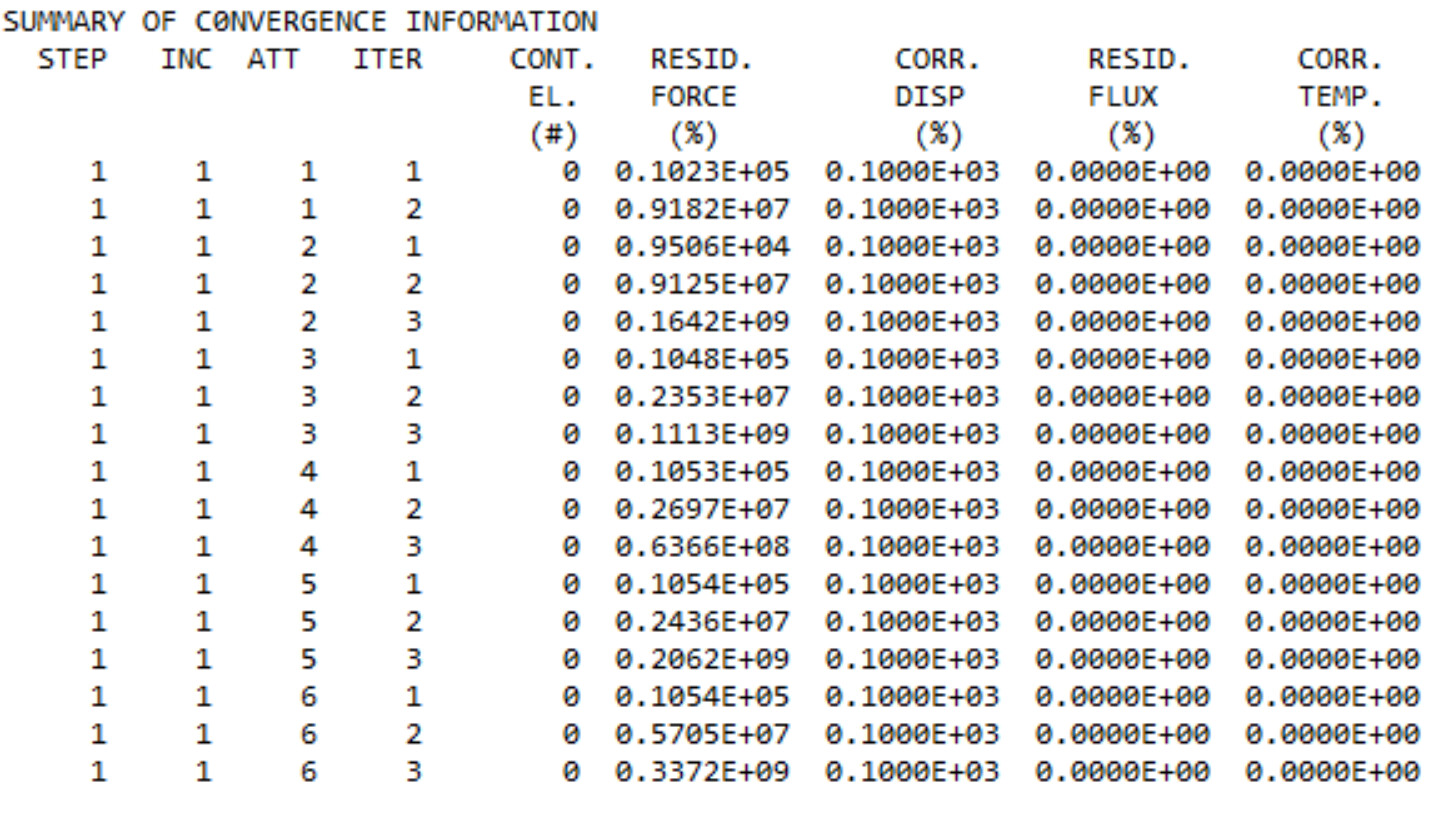
I tried updating the amplitude for the x and y component of the moment and adding the dummy material. Now the model fails to converge and has very odd results:
You still have Nlgeom on. This strange results is just a failed increment (it’s only 0.009 s). But apparently, it may diverge even with this dummy material (after all, this activates the nonlinear solution procedure). As a workaround, you could play with the step controls (that affects the convergence criteria used by the solver).
Also, it may actually matter what properties you set for that dummy material so you may change them to something more realistic (for elasticity and plasticity).
Thanks for the help so far, I think we are on the right track and getting close to a solution.
Here’s what I’ve tried based on your last comment:
Disabled Nlgeom, still fails to converge.
Changed from moment loads to displacements on the free end, still fails to converge. (I’m still trying to use the X and Y amplitudes to control the displacement vector, maybe there is a problem with how I set that up?)
Reducing the step initial/min increment to 1x10^-6 and # of increments to 1000. No joy.
Changed the material back to the default steel option, but added realisitic plasticity data (200MPa yield stress, 0.1 strain). Still fails to converge.
Does this look right for the settings of the amplitude (X and Y components)? As stated, I’d like to avoid needing to set up many simulations manually, it would be fantastic if I could somehow just configure Prepomax to run each angle sequentially.
I reduced the mesh density to have the tests run faster, but when I make the following changes, your hypotube_moment_new_dummy.pmx model runs to completion:
disable Nlgeom
enable Automatic incrementation
use the following properties for the dummy material:
Just keep in mind that to make full use of amplitudes, the time increment used in the analysis must be at least as low as the smallest time interval of the amplitude’s variation.
Somehow, when I run the analysis with the properties you listed, it seems like it’s working now. I’m running the full resolution mesh, so it might take some time, but I will post the results when it completes.
This is likely due to the difference in the plasticity definition. I set it in such a way that yielding could occur only at an extremely high stress level (equal to Young’s modulus which I in turn made more realistic along with Poisson’s ratio).
Try running those two cases separately. The approach with one step and amplitudes is risky because you have to enforce nonlinear solution and some path-dependence may occur. Unfortunately, CalculiX (unlike Abaqus) doesn’t have the load cases feature (multiple linear load cases in a single static perturbation step) but multiple linear steps could replace it. Just watch out for BC and load propagation if you try this approach. It might be easier to export the input file and make the changes in a text editor though if you have lots of steps. It’s actually not so uncommon to have hundreds of load cases and steps.
Could you perhaps provide an example of how this might be done? If I add steps in the .inp file, can I load it back into Prepomax to visualize the result?
You could just define one or two steps in PrePoMax, use File —> Export to write an input file, open it in any text editor, copy, paste and modify the lines between *STEP and *END STEP (in this case, just change the *CLOAD magnitudes and degrees of freedom if needed). Of course, you could use some custom script to automate this. Once you have the input deck ready, submit it using standalone CalculiX as explained here: Using standalone CalculiX
After it completes, you can just use File —> Open to read the results from the .frd file generated by the solver for postprocessing in PrePoMax.
Thanks, that is very helpful! I will do some more experimenting and see if I run into any more issues. I’m currently trying the stepwise method in Propomax (created 8 steps manually with varying displacement vectors).
Rotate the piece Quaiestatically. Gravity load on the tip. I don’t think rotating momentum can be set up in prepomax yet.You would need the moment vector as a function of time plus a polar decomposition of each component . Or a moment in cilindrical coordinates which is not available.
Thanks, that looks pretty good! This is basically what I was trying to do from the beginning. Would you be able to provide the .pmx file as an example? Does it record displacement data per time point increment or per rotation angle?
I need the displacement data per angle, so I’ve decided to go the route of creating multiple steps. It is working for me now, but to make the workflow somewhat manageable, I’m writing a python script to parse the .inp file, multiply the steps and change the moment vectors and write a new .inp file. Then I take the final .inp file and run it via the calculix solver that is provided with PrePoMax, because every other calculix distribution I’ve been able to download on its own doesn’t have the right .dll’s included and won’t run the simulation. Then I load the data file into another custom python script which extracts the displacement data for the reference point from each step and plots it versus angle.
By the way, anyone know how to make calculix run from the command line with multiple cores? The way I’m running it right now is by opening a new terminal in the solver folder (the .inp file must also be in this directory) and running .\ccx_dynamic.exe -i filename
Pardiso indeed needs some dll files. You could use PaStiX (ccx_static) instead, but Pardiso is faster and more reliable.
It’s described in the forum thread about standalone CalculiX that I shared yesterday - you have to change the OMP_NUM_THREADS environment variable. Unfortunately, CalculiX doesn’t have a parameter to control the number of threads for individual runs so you have to set that variable (possibly permanently to the maximum number of physical threads you can use).
I only use the one from the official website (the newest version released a few days ago: https://www.dhondt.de/calculix_2.23_4win.zip). With PaStiX, but it’s offen sufficient. Just make sure you use ccx_static.exe. You can add it to the system’s Path variable to call it from any folder.