i’m having some issues setting up a compression only contact.
I have a steel outer sheath (Blue), surrounding a steel pile (Green), there is an 80mm gap between them that is filled with concrete (red). This will then be bolted together between pile and sheath to take the vertical load on the pile.
The connection is under a vertical load and a bending moment. I want to know the pressure in the concrete where in contacts the pile (green to red connection) but considering the concrete only acting in compression.
I originally tried a hard contact and then re-run it as linear, annoyingly I saved over the old results so only have the linear results to present, but they were much the same.
The compression-only constraint works better with lower contact stiffnesses. So it is always better to start with a lower value and then increase it to fix the penetration.
Hard contact internally is just linear contact with the default constants. The default stiffness is the Young’s modulus of the first material in the input deck multiplied by 50.
For accurate contact stress results, it would be best to mesh the cylindrical parts with linear hex elements. You could use sweep or extrusion technique for that. This usually provides much smoother contact pressure distribution. Of course, you may need to refine the mesh too, it looks rather coarse globally (the question is also what mesh was used in Inventor).
Theoretically, you could also try Mortar contact for even more accurate results, but it’s likely to cause non-convergence and needs the newest CalculiX version available (2.23 at the moment) to work well enough.
This is a much more believable result, i will now run with a finer mesh. i need to read up on the pros and cons of different mesh types, it would be handy to have a video on that.
is there a way of defining this behaviour as a contact type? it would be helpful
Do you mean compression-only elasticity added via Keyword Editor ?
Finer and with hex elements if possible (but you would need to remove the small holes from the cylinders).
I only have an article about hex meshes and element selection in CalculiX written in Polish, but some tips can be found in the CalculiX manual in the chapter on each element type.
In short words, for contact analyses, use linear hex (C3D8R) whenever possible and C3D10 when hex elements can’t be generated.
There is so-called compression-only constraint, but it’s not meant for contact between two parts. Instead, it’s a one-way support - it’s applied to a face to resist compression, but not tension.
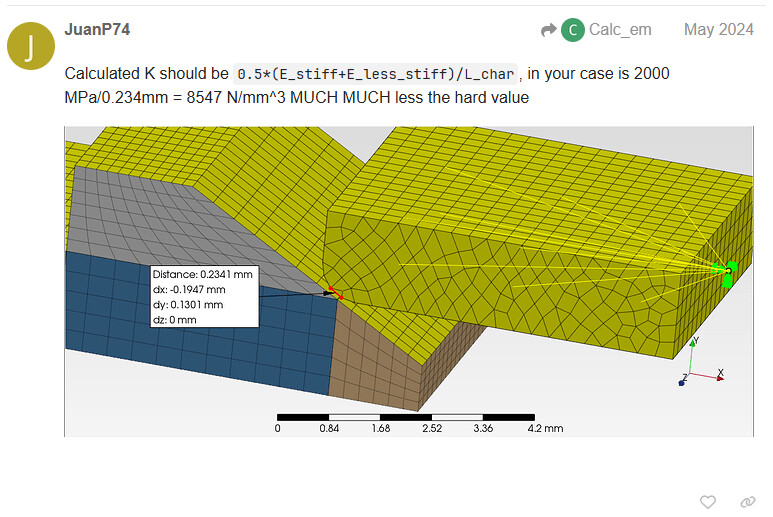
No, it’s a characteristic average length of finite elements in the contact regions. So it should be much smaller - you would have to roughly measure some elements as shown in the snap-fit screenshot.